0 ratings


Item #:
35867044
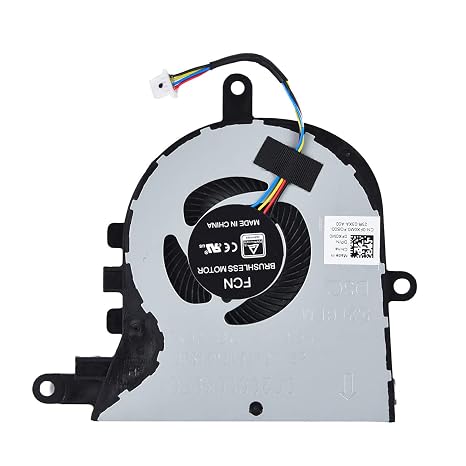
Replacement CPU Cooling Fan for Dell inspiron 15 5570 5575 3580 3593, inspiron 17 3780 3793, Latitude 3590 L3590 E3590 Series Laptop P/N: FX0M0
88% of respondents would recommend this to a friend
Item #:
35867044
€ 16
Price Details
Excluding Shipping & Custom charges ( Shipping and custom charges will be calculated on checkout )
*All items will import from US
6%
0 ratings
Write a review
100+ bought
In stock
 Imported from USA store
QTY:
Order now and get it around Thursday, October 01
Secured transaction
Ubuy works hard to protect your security and privacy. Our advanced payment security system ensures confidentiality by encrypting your information during transmission using AES (Advanced Encryption Standards) and SSL (Secure Socket Layer) protocols. Your payment details are 100% secure as we do not share your payment details with third party sellers.
Our Top Logistics Partners


Keep your Dell laptop running smoothly with this Replacement CPU Fan.

Buy Now Pay Later

Fast
Shipping

Free
Return*

Secure Packaging

100% Original Products

PCI DSS Compliance

ISO 27001 Certified




Note: Step Down Voltage Transformer required for using electronics products of US store (110-120). Recommended power converters Buy Now.


What Stands Out
Perfect Compatibility
Designed specifically for Dell Inspiron and Latitude series, ensuring a seamless fit and optimal performance without compatibility concerns for models 5570, 5575, 3580, and more.
Efficient Cooling
This fan enhances airflow and heat dissipation, preventing overheating during intensive tasks, thus prolonging the lifespan of your laptop components and maintaining optimal performance.
Easy Installation
User-friendly design allows for straightforward installation, letting consumers replace their existing fan effortlessly without needing extensive technical knowledge or professional assistance.
Product Details
- Compatible with Dell Inspiron 15 3580 3593 5570 5575, Inspiron 17 3780 3793, Latitude 3590 L3590 E3590 series laptops
- Compatible part numbers: FX0M0 0FX0M0 DFS1503055P0T
- Power connection: 4 wires/4 pins connector
- Brand new replacement CPU cooling fan for faulty/cracked/broken Dell Inspiron 15 5570 5575 3580 3593, Inspiron 17 3780 3793 & Latitude 3590 E3590 laptop CPU cooling fan
- Package includes: 1x Replacement CPU fan
| Power Connector Type | 4-Pin |
| Voltage | 5 volts |
| Wattage | 3 watts |
| Cooling Method | Air |
| Compatible Devices | Dell Latitude 3590 L3590 E3590, inspiron 13 3780 3793 Laptop, inspiron 15 5570 5575 5770 3580 3593 |
| Material Type | Metal |
| Brand Name | KBRPARTS |
| UPC | 762917712536 |
| Number of Packs | 1 |
| Manufacturer | KBRPARTS |
| Number of Items | 1 |
| Unit Count | 1 Count |
| Item Weight | 9.07 g |
| Model | FX0M0 |
| Part Number | FX0M0 |
| Brand | KBRPARTS |
| Material | Metal |
| Country of Origin | This item will be imported from US |
| What is in the box | Replacement CPU Cooling Fan... For more details, please check description/product details |
Who Should Buy?

-
Overheating Issues
Ideal for users experiencing overheating problems with their Dell laptops needing an efficient cooling solution.
-
DIY Repair Enthusiasts
Perfect for individuals comfortable with laptop repairs who want a reliable replacement fan for cost savings.
-
Budget-Conscious Users
A cost-effective choice for users looking to maintain laptop performance without spending on a new device.

-
Non-Dell Laptops
Not suitable for laptops from other brands, as it is specifically designed for Dell models only.
Product Description
Have any Query? Chat with us
Product Buying Guide
Keep your Dell laptop running smoothly with the Replacement CPU Cooling Fan. This guide is designed to help you understand the product specifications, key features, usage scenarios, competitor comparison, user reviews, price analysis, and buying considerations for this essential component.
Product Specifications
- Dell inspiron 15 3580 3593 5570 5575, inspiron 17 3780 3793, Latitude 3590 L3590 E3590 Series Laptop
- FX0M0 0FX0M0 DC28000K9D0 DFS1503055P0T FK3A
- 4 wires / 4 pins connector
Key Features
- Keeps your laptop's temperature at an optimal level
- Simple and hassle-free replacement process
- Reliable and durable for long-term use
Usage Scenarios
- Ideal for addressing laptop overheating problems
- Suitable for replacing faulty or broken cooling fans
- Useful for regular laptop maintenance to prevent overheating
Usage Scenarios
- Similar cooling fan with different power specifications
- Alternative brand offering a comparable cooling solution
Some User Review
- The fan works perfectly and has resolved the overheating problem in my Dell laptop.
- Easy to install, and the build quality seems excellent. My laptop runs much cooler now.
Competitors
- Competitively priced compared to similar cooling fans
- Offers a cost-effective solution for Dell laptop owners
Buying Considerations
- Ensure compatibility with your specific Dell laptop model
- Refer to online resources or seek professional assistance for installation
Conclusion
The Replacement CPU Cooling Fan for Dell inspiron 15 5570 5575 3580 3593, inspiron 17 3780 3793, Latitude 3590 L3590 E3590 Series Laptop is an essential solution to maintain optimal temperature levels and prevent overheating. With its easy installation, high-quality build, and competitive pricing, it offers great value for Dell laptop users.
View LessKeep your Dell laptop running smoothly with the Replacement CPU Cooling Fan. This guide is designed to help you understand the product specifications, key features, usage scenarios, competitor comparison, user reviews, price analysis, and buying considerations for this essential component. Continue Reading
Customer Questions & Answers
-
Question:
How to Shop Replacement CPU Cooling Fan for Dell inspiron 15 Online From Ubuy?
Answer: It’s easy to shop Replacement CPU Cooling Fan for Dell inspiron 15 online from Ubuy. You just have to search for the product, choose your shipping method while checking out and get it delivered to your location. -
Question:
Is Replacement CPU Cooling Fan for Dell inspiron 15 Available to Shop Online in Ireland?
Answer: Yes, at Ubuy Ireland this product is available for you to shop at a reasonable price. The Replacement CPU Cooling Fan for Dell inspiron 15 is not available locally but you can trust us with our express shipping services. -
Question:
How Long Does It Take to Get Product After Placing the Order?
Answer: The delivery time of your ordered product varies as per what you've ordered and the shipping method that you've chosen. The estimated delivery time is mentioned during the checkout process, so be carefree while shopping.
KBRPARTS CPU Cooling Fans Editorial Review
The Replacement CPU Cooling Fan for Dell Inspiron and Latitude Series Laptops PN: FX0M0 0FX0M0 has received positive feedback from customers. Users have praised its compatibility with the original fan, including the wiring hold down for the video cable built into the fan housing. The installation process has been described as easy, and the fan has been noted to operate quietly. Some customers have reported that the fan was a bit difficult to install initially, but overall, it performs well. It has been effective in replacing noisy fans and is Considered a great value for money. The fan has shown durability over time, with one customer noting that it still operates just as well as it did five months after purchase. Overall, customers seem satisfied with this replacement CPU cooling fan, as it effectively replaces faulty or noisy fans and functions quietly.
Customer Reviews & Ratings
265 customers ratings
-
5 Star
81%
-
4 Star
9%
-
3 Star
2%
-
2 Star
2%
-
1 Star
6%
Review this product
Share your thoughts with other customers
Pros
- Compatible with original fan, including wiring hold down for video cable
- Easy installation process
- Operates quietly
- Great value for money
- Durable and long-lasting performance
Cons
- Some users found the installation process a bit difficult initially
Product Price History
Important information
- Limitations : For products shipped internationally, please note that any manufacturer warranty may not be valid; manufacturer service options may not be available; product manuals, instructions, and safety warnings may not be in destination country languages; the products (and accompanying materials) may not be designed in accordance with destination country standards, specifications, and labeling requirements; and the products may not conform to destination country voltage and other electrical standards (requiring use of an adapter or converter if appropriate). The recipient is responsible for assuring that the product can be lawfully imported to the destination country. When ordering from Ubuy or its affiliates, the recipient is the importer of record and must comply with all laws and regulations of the destination country.
- Not all the products listed on Ubuy are for sale, as Ubuy is a global search engine. Products are subject to export/trade regulations.
€ 16
Order now and get it around Thursday, October 01
This item is not restrict in my country.(Please click on above link if this item is not restrict in your country, So our team will review and allow.)
QTY:
Secured transaction
PCI DSS compliant and ISO 27001:2022 certified, with encrypted payments and full buyer protection on every order.
Our Top Logistics Partners
Fastest cross-border delivery
Features & Benefits
- Compatible with various Dell laptop models
- Ensures optimal cooling for your laptop
- Easy to install
- High-quality replacement part
- Package includes one fan
Ubuy Assurance
Experience worry-free shopping with 100% original products, PCI DSS-compliant payment security, ISO 27001-certified data protection, the fastest cross-border delivery, free returns *, and secure packaging on every order.