- Home Page /
- Electronics /
- Computer Accessories /
- Computer Accessories & Peripherals /
- Input Devices /
- Touch Pads /
- ProtoArc Wired USB Trackpad for Windows 10/11...
0 ratings




Item #:
152589532
ProtoArc Wired USB Trackpad for Windows 10/11, Large High-Precision T1 Wired Trackpad Mouse with Multi-Gesture, Ultra Slim Portable Aluminum Touchpad
Item #:
152589532
€ 38
Price Details
Excluding Shipping & Custom charges ( Shipping and custom charges will be calculated on checkout )
*All items will import from US
38%
In stock
 Imported from USA store
QTY:
Order now and get it around Tuesday, July 07
Secured transaction
Ubuy works hard to protect your security and privacy. Our advanced payment security system ensures confidentiality by encrypting your information during transmission using AES (Advanced Encryption Standards) and SSL (Secure Socket Layer) protocols. Your payment details are 100% secure as we do not share your payment details with third party sellers.
Our Top Logistics Partners


ProtoArc Wired Trackpad is a great alternative to computer mice when desk space is limited.

Buy Now Pay Later

Fast
Shipping

Free
Return*

Secure Packaging

100% Original Products

PCI DSS Compliance

ISO 27001 Certified


Note: Step Down Voltage Transformer required for using electronics products of US store (110-120). Recommended power converters Buy Now.


What Stands Out
High Precision
Delivers exceptional tracking accuracy with advanced sensors, ensuring smooth navigation and responsiveness for users needing precise control in creative or office applications.
Multi-Gesture Support
Supports a range of multi-touch gestures, enhancing user interaction and productivity by enabling intuitive controls for tasks such as scrolling, zooming, and switching between applications effortlessly.
Portable Design
Ultra-slim and lightweight aluminum design makes it easy to transport, making it an ideal choice for professionals on the go who need reliable input devices without sacrificing space.
Product Details
- Wired only (via USB-C cable) – provides stable connection, but is NOT compatible with Mac, Chrome, or Linux.
- Windows Only: The Large Wired Trackpad for Windows10/11 is compatible with Windows 11, Windows 10, PC, laptops and desktop computers. Note: Not compatible with Mac/Chrome OS/Linux. Not recommended for use on other systems. Some touchpad gestures or functions may be missing
- Convenient left and right physical clicks: The wired trackpad supports physical clicks of the left and right buttons at the bottom to realize the left and right mouse button functions. It also supports full-area single-click to realize the left mouse button function and two-finger single-tap for right mouse clicks, which is convenient for you to select text/documents and drag large areas easily
- How to drag files and select text: Double-click with one finger + hold/slide to drag files or select text
- Multiple gestures support: The touchpad supports multiple gestures and supports up to four-finger operation, which is smoother than the laptop touchpad operation. Fast and sensitive response, at your fingertips. Multiple functions, including smooth screen clicks, scrolling up and down pages, pinching to enlarge photos, etc.
- How to adjust the touchpad cursor speed: Open "Windows Settings" → "Bluetooth and other devices" → "Touchpad". Adjust the "Cursor Speed" slider to suit your preference (slower ← → faster)
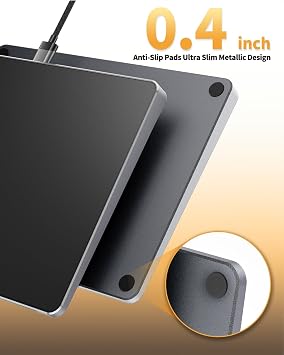
- Extra Large Metal Touchpad: Large 6.4 inch touch screen, size 6.4*4.8*0.4 inches, thickness 0.19in-0.39in, compared with the traditional touch pad is even thinner
- Plug and Play, Stable USB C Connection: Simply plug the USB cable into the USB port of your computer and the touchpad is ready to use, no additional drivers required. The USB C cable's reliable and stable connection allows you to use it easily without any connection issues
- Note: If you disable the built-in touchpad on your laptop, any external wired or wireless touchpad you connect will usually also be disabled and fail to work properly.
| Connectivity Technology | USB |
| Additional Features | Ergonomic Design, Lightweight, Portable, Wired |
| Movement Detection | Optical |
| Button Quantity | 2 |
| Hand Orientation | Ambidextrous |
| Compatible Devices | Personal Computer |
| Operating System | Windows 10/11 |
| Power Source | Wired |
| Minimum Required Operating System Version | Windows 10 |
| Color | Black |
| Style Name | Modern |
| Enclosure Material | Aluminum |
| Brand | ProtoArc |
| Antenna Location | Office |
| Built-In Media | 1* Type-Cable, 1* User Manal, 1* Wired Trackpad for Windows |
| Are Batteries Included | No |
| Are Batteries Required | No |
| Manufacturer | ProtoArc |
| Unit Count | 1.0 Count |
| Special Feature | Ergonomic Design, Lightweight, Portable, Wired |
| Movement Detection Technology | Optical |
| Item Weight | 1.5 lbs (680 grams) |
What's in the box
1* Wired Trackpad for Windows
1* Type-Cable
1* User Manal
Who Should Buy?

-
Graphic Designers
Beneficial for precise control and multi-gesture capabilities necessary for detailed design work.
-
Mobile Professionals
Ideal for users needing a portable, slim trackpad that connects easily to laptops for on-the-go work.
-
Windows Users
Designed specifically for Windows 10/11, maximizing compatibility and functionality for these operating systems.

-
Gamers
May not provide the fast responsiveness and accuracy required for gaming performance.
-
Casual Users
Basic users may prefer a simpler mouse without advanced features like multi-gesture functionality.
-
Apple Users
Not optimized for macOS, making it less suitable for users who primarily work on Apple devices.
Product Description
Have any Query? Chat with us
Customer Questions & Answers
-
Question:
What are the main features of the ProtoArc Wired USB Trackpad?
Answer: The ProtoArc Wired USB Trackpad boasts several impressive features, including high precision tracking, support for multi-gesture commands, and an ultra-slim design. Its large surface area allows for smooth navigation, making it ideal for both casual users and professionals seeking efficient input devices. The multi-gesture capability enhances productivity, especially when navigating complex software applications or browsing the web. Whether you're swiping to switch apps or using pinch-to-zoom, this trackpad facilitates a fluid user experience. -
Question:
Is the ProtoArc Wired USB Trackpad compatible with both Windows 10 and 11?
Answer: Yes, the ProtoArc Wired USB Trackpad is fully compatible with Windows 10 and 11. Designed specifically for these operating systems, it brings a seamless user experience without the need for additional software or drivers. Simply plug it into your USB port, and you're ready to go. This makes it an excellent choice for users who want straightforward and reliable performance on their Windows devices, whether for office work, gaming, or creative tasks. -
Question:
How does the multi-gesture functionality enhance user experience?
Answer: The multi-gesture functionality of the ProtoArc Wired USB Trackpad significantly enhances user interaction by allowing more intuitive control over applications. Users can perform actions like scrolling, swiping between tabs, and zooming with simple finger motions. This improves usability, especially for those who work with design software or need to manage multiple windows efficiently. By incorporating gestures into your daily workflow, you can navigate your computer with greater efficiency and speed. -
Question:
Is the ProtoArc Wired USB Trackpad portable?
Answer: Absolutely! The ProtoArc Wired USB Trackpad features an ultra-slim design that makes it highly portable. Its lightweight aluminum construction ensures durability without weighing you down. This makes it an excellent option for people who travel frequently or work in various locations. You can easily slip it into a laptop bag or backpack, making it a convenient choice for professionals, students, or anyone who needs a reliable input device on the go. -
Question:
What materials are used in the construction of the ProtoArc Wired USB Trackpad?
Answer: The ProtoArc Wired USB Trackpad is constructed from high-quality aluminum, which not only provides a sleek and modern look but also ensures durability and stability during use. The touch surface is designed to be responsive to your gestures, providing a tactile feedback experience. This combination of materials allows for long-lasting performance, making it a great investment for those looking for a reliable trackpad that can withstand everyday use. -
Question:
Can the trackpad be used for gaming purposes?
Answer: While primarily designed for productivity and general use, the ProtoArc Wired USB Trackpad can be utilized in gaming scenarios as well. Its high-precision sensitivity and responsive gestures can enhance gameplay, particularly in strategy and simulation games that benefit from nuanced control. However, for fast-paced action games, many gamers prefer traditional mice. It offers a unique alternative for casual gaming or for those who enjoy a touchpad experience. -
Question:
How do I connect the ProtoArc Wired USB Trackpad to my computer?
Answer: Connecting the ProtoArc Wired USB Trackpad to your computer is a straightforward process. Simply plug the USB cable into an available port on your computer, and it will automatically recognize the device. With no need for additional software installations or complicated setups, you'll be navigating your system in no time. This plug-and-play feature is perfect for users who appreciate quick and hassle-free connectivity. -
Question:
What are some practical use cases for the ProtoArc Wired USB Trackpad?
Answer: The ProtoArc Wired USB Trackpad shines in various scenarios, including office work, graphic design, and casual browsing. Professionals can leverage its multi-gesture capabilities for quick navigation through documents and spreadsheets, while creatives can benefit from precise cursor control when working on design projects. Additionally, its portability makes it a perfect companion for students attending lectures, enabling easy maneuverability between tasks and presentations. -
Question:
Does the ProtoArc Wired USB Trackpad come with any specific software or drivers?
Answer: The ProtoArc Wired USB Trackpad doesn't require any specific software or drivers for operation on Windows 10 and 11. Its plug-and-play functionality means that you can simply connect it to your computer and start using it right away. Enjoy extensive customization options for gestures through native Windows settings if you prefer to tailor your experience, allowing for a personalized touch without the hassle of additional installations. -
Question:
Where can I buy the ProtoArc Wired USB Trackpad for Windows 10/11?
Answer: You can buy the ProtoArc Wired USB Trackpad from Ubuy in Ireland. Ubuy offers a convenient platform to explore and purchase this device, ensuring you have access to quality electronics. With a user-friendly interface and various shipping options, Ubuy is a reliable choice for obtaining the ProtoArc Wired USB Trackpad while also providing excellent customer service.
ProtoArc Touch Pads Editorial Review


No editorial reviews found
Customer Reviews & Ratings
95 customers ratings
-
5 Star
70%
-
4 Star
10%
-
3 Star
10%
-
2 Star
5%
-
1 Star
5%
Review this product
Share your thoughts with other customers
Top selling Wired USB Trackpad in Ireland



Last Updated on June 29, 2026
Product Price History
Important information
- Limitations : For products shipped internationally, please note that any manufacturer warranty may not be valid; manufacturer service options may not be available; product manuals, instructions, and safety warnings may not be in destination country languages; the products (and accompanying materials) may not be designed in accordance with destination country standards, specifications, and labeling requirements; and the products may not conform to destination country voltage and other electrical standards (requiring use of an adapter or converter if appropriate). The recipient is responsible for assuring that the product can be lawfully imported to the destination country. When ordering from Ubuy or its affiliates, the recipient is the importer of record and must comply with all laws and regulations of the destination country.
- Not all the products listed on Ubuy are for sale, as Ubuy is a global search engine. Products are subject to export/trade regulations.
€ 38
Order now and get it around Tuesday, July 07
This item is not restrict in my country.(Please click on above link if this item is not restrict in your country, So our team will review and allow.)
QTY:
Secured transaction
Ubuy works hard to protect your security and privacy. Our advanced payment security system ensures confidentiality by encrypting your information during transmission using AES (Advanced Encryption Standards) and SSL (Secure Socket Layer) protocols. Your payment details are 100% secure as we do not share your payment details with third party sellers.
Our Top Logistics Partners
Fastest cross-border delivery
Features & Benefits
- Designed specifically for Windows 10/11 compatibility.
- Connects via USB-C for a stable wired connection.
- Supports physical clicks and full-area single-click functionality.
- Facilitates multi-gesture operations to enhance productivity.
- Ideal for limited desk space and easier usage than traditional mice.
- Not compatible with Mac/Chrome/Linux systems.