0 ratings





Item #:
216134710
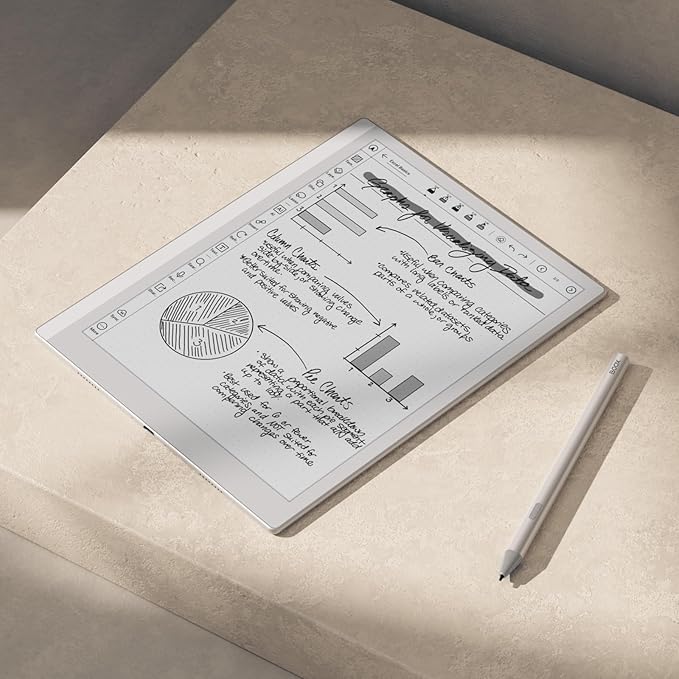
BOOX Tablet Go 10.3 Gen II Lumi ePaper E Ink Tablet Notebook
Item #:
216134710
€ 510
Price Details
Excluding Shipping & Custom charges ( Shipping and custom charges will be calculated on checkout )
*All items will import from US
In stock
 Imported from USA store
QTY:
Order now and get it around Sunday, August 16
Secured transaction
Ubuy works hard to protect your security and privacy. Our advanced payment security system ensures confidentiality by encrypting your information during transmission using AES (Advanced Encryption Standards) and SSL (Secure Socket Layer) protocols. Your payment details are 100% secure as we do not share your payment details with third party sellers.
Our Top Logistics Partners


Reduce ghosting and enhance your viewing experience with multiple refresh modes tailored to your needs.

Buy Now Pay Later

Fast
Shipping

Free
Return*

Secure Packaging

100% Original Products

PCI DSS Compliance

ISO 27001 Certified


Note: Step Down Voltage Transformer required for using electronics products of US store (110-120). Recommended power converters Buy Now.


What Stands Out
E-Ink Display
Experience reading like paper with a high-resolution E-Ink display that reduces eye strain, providing a comfortable experience for long hours of study or note-taking.
Lightweight Design
Portability is key with this ultra-slim and lightweight tablet, making it easy to carry anywhere, ideal for students and professionals on the go.
Versatile Functionality
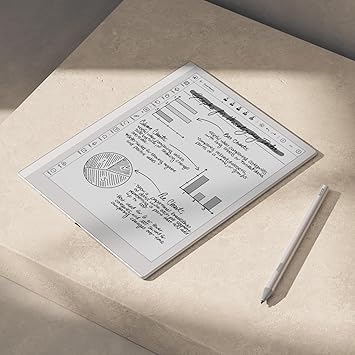
Combine note-taking, reading, and sketching with advanced features including handwriting recognition and adjustable front light, catering to diverse user needs.
Product Details
- Select Refresh Mode to reduce ghosting: HD Mode (System Default): For reading books and other static content. Balanced Mode (Default for third-party apps in color E Ink models): For turning pages and browsing books and pictures. Fast Mode (Default for third-party apps in monochrome E Ink models): For browsing websites and other content that require scrolling. Ultrafast Mode: For video and other dynamic contents. *Regal Mode: As a refresh solution with less ghosting and better display quality especially optimized for color E Ink models.
- Screen: 10.3" HD ePaper glass screen with flat cover-lens Resolution: 2480x1860 (300 ppi) Touch: BOOX InkSense Plus stylus touch (4,096 levels of pressure sensitivity) + capacitive touch
- CPU: Octa-core RAM: 4GB ROM: 64GB Connectivity: Wi-Fi (2.4GHz + 5GHz) + BT 5.1 G-sensor for Auto Rotation Front Light with CTM (Warm and Cold)
- OS: Android 15 Document Formats: PDF, CAJ, DJVU, CBR, CBZ, EPUB, EPUB3, AZW3, MOBI, TXT, DOC, DOCX, FB2, CHM, RTF, HTML, ZIP, PRC, PPT, PPTX Image Formats: PNG, JPG, BMP, TIFF Audio Formats: WAV, MP3 Supports 3rd-party apps
- Button: Power Button USB-C Port (Supports OTG or use as an audio jack) Built-in Dual Speakers Built-in Microphone Battery: 3,700mAh Li-ion Polymer Dimensions: 235*183*4.8mm (9.3" x 7.2" x 0.19") Weight: Approx. 364g (12.8oz)
| Display Technology | Electronic Ink |
| Connectivity Technology | Bluetooth, Wi-Fi |
| Screen Size | 10.3 inches (26.2 cm) |
| Memory Storage Capacity | 64 GB |
| Battery Average Life | 1 days |
| Native Resolution | B/W: 2480 x 1860 (300 ppi) |
| File Format | EPUB, MOBI, PDF, TXT, DOC, DOCX, HTML, PRC, FB2, CHM, RTF, DJVU, CBR, CBZ, BMP, JPG, PNG, TIFF |
| Other Special Features of the Product | Adjustable Front Light |
| Battery Description | Lithium-Ion Polymer |
| RAM Memory Installed | 4 GB |
| Human-Interface Input | Touchscreen with Stylus Support |
| Item Dimensions L x W x Thickness | 9"L x 7"W x 0.17"Th (22.9 x 17.8 x 0.4 cm) |
| Brand | BOOX |
| Model Name | Go 10.3 Gen II Lumi |
| Built-In Media | DEVICE, Stylus |
| Manufacturer | BOOX |
| Model Number | Go 10.3 Gen II Lumi |
| Mfr Part Number | Go 10.3 Gen II Lumi |
| Unit Count | 1 Count |
| Battery Life | 1 days |
| Display resolution | B/W: 2480 x 1860 (300 ppi) |
| Included Components | DEVICE, Stylus |
| Product Dimensions (L x W x H) | 9"L x 7"W x 0.17"Th (22.9 x 17.8 x 0.4 cm) |
What's in the box
DEVICE
Stylus
Who Should Buy?

-
Students and Educators
Ideal for taking notes, reading textbooks, and accessing educational materials in a portable, lightweight format.
-
Writers and Journalists
Perfect for drafting articles, writing stories, and organizing thoughts in a distraction-free environment.
-
Professionals on the Go
Great for business professionals who need a reliable tool for note-taking, planning, and document reviewing during meetings.

-
Graphic Designers
Not suitable for those needing high-quality color displays or advanced graphic editing capabilities.
Product Description
Have any Query? Chat with us
Related Searches
Customer Questions & Answers
-
Question:
What are the key features of the BOOX Tablet Go 10.3 Gen II Lumi?
Answer: The BOOX Tablet Go 10.3 Gen II Lumi features a 10.3-inch E Ink display, which offers a paper-like reading experience ideal for long-duration reading and writing. It is equipped with a powerful processor and ample storage for seamless multitasking. Moreover, the device supports stylus input, facilitating note-taking and creative tasks. The device is also lightweight and portable, making it perfect for students or professionals who need to work on-the-go. -
Question:
Is the BOOX Tablet Go suitable for reading and taking notes?
Answer: Yes, the BOOX Tablet Go is specifically designed for reading and note-taking. The E Ink technology minimizes eye strain, making it suitable for extended reading sessions. The tablet also supports stylus usage, allowing users to jot down notes or sketches directly on the screen. This is particularly beneficial for students and professionals who prefer a digital format to organize their thoughts and insights during lectures or meetings. -
Question:
Can I install Android apps on the BOOX Tablet Go?
Answer: Absolutely, the BOOX Tablet Go runs on a custom version of Android that allows you to install and use a variety of Android applications. This opens up possibilities for using productivity tools, e-reading apps, and more. For instance, you can download applications like Kindle for reading e-books or Evernote for organizing your notes efficiently. This versatility makes the tablet not just a reading device but a multifunctional tool. -
Question:
How does the battery life of the BOOX Tablet Go compare to traditional tablets?
Answer: The BOOX Tablet Go boasts an impressive battery life that significantly outlasts traditional tablets. Thanks to E Ink technology, it consumes far less power, often lasting several weeks on a single charge during standard use. This means you can read or annotate documents without worrying about frequent recharging. It's particularly advantageous for students who may be in lectures for extended periods or professionals traveling without immediate access to charging. -
Question:
What accessories are recommended for the BOOX Tablet Go?
Answer: To enhance your experience with the BOOX Tablet Go, consider purchasing a compatible stylus for precise writing and drawing. A protective case will help safeguard the device while on the move. Additionally, screen protectors can prevent scratches and keep your display in pristine condition. These accessories provide not just protection but also facilitate better usability for note-taking and creative applications. -
Question:
Can the BOOX Tablet Go connect to Wi-Fi and Bluetooth devices?
Answer: Yes, the BOOX Tablet Go supports both Wi-Fi and Bluetooth connectivity. This enables you to connect to the internet for downloading materials or syncing data across devices. With Bluetooth, you can connect wireless peripherals like keyboards and headphones, enhancing your productivity while working. This connectivity ensures that you're always in touch with your digital resources whether you're at home or on the go. -
Question:
Is the screen of the BOOX Tablet Go glare-free?
Answer: Yes, the BOOX Tablet Go features a glare-free E Ink display, making it perfect for outdoor usage or under bright lights. Unlike traditional screens, it doesn’t reflect light, allowing for a comfortable reading experience in varying environments. This feature is particularly beneficial for users who spend considerable time outdoors or prefer reading near windows where glare might be a concern. -
Question:
What file formats are supported by the BOOX Tablet Go?
Answer: The BOOX Tablet Go supports a wide array of file formats, including PDF, EPUB, MOBI, TXT, and more. This versatility allows you to view documents, ebooks, and various types of content without needing to convert files. It's particularly useful for users dealing with academic papers or professional documents that come in different formats, ensuring seamless interaction with your materials. -
Question:
How can I take notes on the BOOX Tablet Go?
Answer: To take notes on the BOOX Tablet Go, simply use the included stylus to write directly on the screen. The device offers several note-taking applications that allow for annotation and organization of your thoughts. Whether in a classroom setting or during a meeting, you'll find this functionality particularly useful for quick jotting down of ideas or detailed note-taking. The digitized notes can be easily saved and managed within the device's storage. -
Question:
Where can I buy the BOOX Tablet Go 10.3 Gen II Lumi in Ireland?
Answer: You can purchase the BOOX Tablet Go 10.3 Gen II Lumi at Ubuy. They offer a variety of e-commerce solutions and deliver this innovative tablet directly to your location in Ireland. It's a reliable platform where you can explore additional specifications, compare features, and make your purchase with confidence.
BOOX Tablets Go 10.3 Gen II Lumi Editorial Review


The BOOX Tablet Go 10.3 Gen II Lumi ePaper E Ink Tablet Notebook presents an intriguing proposition for digital note-takers and readers alike. Customers exhibit mixed feelings about the device, ultimately leading to a diverse set of experiences. Some users appreciate the tablet's great screen quality, low pen latency, and the addition of Android 15, indicating it is a commendable upgrade from previous models. However, others feel disappointed by specific aspects of the tablet's performance. The front light, hailed as a feature, has been criticized for its overly cool tones that lack the warmer settings found in rival products like Kindle. Many have found the overall design lacking in refinement, with particular discontent directed towards the faux leather backing and a pen that some describe as cumbersome due to its charging requirement and notable latency issues. Moreover, the user interface has been pointed out as less intuitive compared to competitors, adding to a sense of frustration for some users. Problems such as spontaneous device restarts when closing the folio have also been reported, raising concerns about reliability. In summary, the BOOX Tablet Go 10.3 Gen II Lumi showcases promising innovation with potential strengths, but it appears to fall short in several critical areas that could significantly impact user experience. For those Considering this tablet, it's essential to weigh these Pros and Cons carefully. **
Customer Reviews & Ratings
42 customers ratings
-
5 Star
63%
-
4 Star
7%
-
3 Star
16%
-
2 Star
6%
-
1 Star
8%
Review this product
Share your thoughts with other customers
Pros
- Great display quality
- Low pen latency
- Runs on the latest Android 15
Cons
- Front light lacks warm settings and is perceived as too cold
Platform Trust & Buyer Confidence

MA
Mohammad
Verified buyer
“Excellent quality and original too,when ubuy send original things I will appreciate that ,I very satisfied thank you”
23 July 2026 · via Trustpilot
CK
Chitra
Verified buyer
“The order and delivery progress was communicated very well. Package arrived within the estimated time. Products arrived as expected in good condition.”
22-Jul-26 · via Trustpilot
K
kund
Verified buyer
“Good supply of products. Safe payment methods, and shipment worldwide! Genuine products.”
23-Jul-26 · via Trustpilot
OO
Onesi
Verified buyer
“Was my first time buying a product from Ubuy, but I found it so helpful. This is reliable. Gonna place a new order!”
22 July 2026 · via Trustpilot
SJ
SAO JOHN
Verified buyer
“Ubuy is a great online platform to buy stuff. Reliable, fast delivery time and great value for money. I've been using Ubuy online shopping platform for three years now and will continue to do so.”
23 July 2026 · via Trustpilot
Secure Checkout
Global Delivery
Easy Returns
Genuine Products
Related Categories
Top selling ePaper Tablet in Ireland


Last Updated on July 26, 2026
Product Price History
Important information
- Limitations : For products shipped internationally, please note that any manufacturer warranty may not be valid; manufacturer service options may not be available; product manuals, instructions, and safety warnings may not be in destination country languages; the products (and accompanying materials) may not be designed in accordance with destination country standards, specifications, and labeling requirements; and the products may not conform to destination country voltage and other electrical standards (requiring use of an adapter or converter if appropriate). The recipient is responsible for assuring that the product can be lawfully imported to the destination country. When ordering from Ubuy or its affiliates, the recipient is the importer of record and must comply with all laws and regulations of the destination country.
- Not all the products listed on Ubuy are for sale, as Ubuy is a global search engine. Products are subject to export/trade regulations.
€ 510
Order now and get it around Sunday, August 16
This item is not restrict in my country.(Please click on above link if this item is not restrict in your country, So our team will review and allow.)
QTY:
Secured transaction
PCI DSS compliant and ISO 27001:2022 certified, with encrypted payments and full buyer protection on every order.
Our Top Logistics Partners
Fastest cross-border delivery
Features & Benefits
- Features selectable Refresh Modes to optimize display.
- HD Mode for comfortable reading of static content.
- Balanced Mode for seamless browsing in color E Ink.
- Fast Mode for smooth scrolling in monochrome E Ink apps.
- Ultrafast Mode designed for dynamic video content.
- Regal Mode offers superior display quality, minimizing ghosting.
Ubuy Assurance
Experience worry-free shopping with 100% original products, PCI DSS-compliant payment security, ISO 27001-certified data protection, the fastest cross-border delivery, free returns *, and secure packaging on every order.